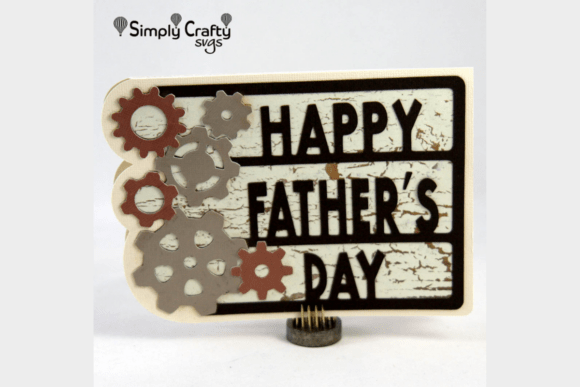
Gears Father's Day Card SVG: A Mechanical Masterpiece for Dad
For the dad who loves tinkering, tools, or anything with moving parts, a Gears Father's Day Card SVG offers a unique and thoughtful way to say "thanks." This industrial-style design combines mechanical aesthetics with practical crafting, making it a standout choice for Father's Day. Whether you're a beginner or a seasoned crafter, this SVG file brings both style and function to your handmade card.
Why Choose the Gears Father's Day Card SVG?
The Gears Father's Day Card SVG is more than just a trendy design — it's a meaningful way to celebrate a dad who appreciates craftsmanship, engineering, or hands-on work. Its intricate gear and cogwheel motifs give it a masculine, industrial edge that's perfect for a variety of personalities. Plus, it’s designed for quick assembly, so you can create a high-impact card without spending hours on it.
Measuring 7" x 5" when completed, this card fits perfectly into a standard A7 envelope, making it easy to mail and display. It's also compatible with most home cutting machines, so whether you use a Cricut, Silhouette, or another brand, you can bring this design to life with ease.
Common Mistakes and How to Avoid Them
While the Gears Father's Day Card SVG is designed to be user-friendly, there are a few common mistakes that crafters often make — especially if they're new to working with SVG files or card assembly. Understanding these pitfalls can help you save time, avoid frustration, and create a more polished final product.
Mistake #1: Skipping the Test Cut
One of the most frequent oversights is jumping straight into cutting the final cardstock without testing the design on a less expensive material first. This can lead to costly errors if the file isn't sized correctly or if your machine isn't calibrated properly.
Solution: Always do a test cut on scrap paper or pattern paper before using your premium cardstock. This allows you to check alignment, size, and layer placement without wasting materials.
Mistake #2: Using the Wrong Cardstock
Many people assume any cardstock will work, but using a paper that's too thin or too flimsy can affect how well the gears and layers hold up and how professional the final card looks.
Solution: The Gears Father's Day Card SVG is best paired with sturdy cardstock like American Crafts AC Textured Cardstock. This 12 x 12 inch vanilla metallic cardstock provides a clean, durable base that supports the mechanical design and gives a polished finish.
Mistake #3: Ignoring Layer Order and Assembly Instructions
SVG files often come with multiple layers that need to be cut and assembled in a specific order. Skipping or misplacing these steps can result in a confusing or misaligned final product.
Solution: Follow the included step-by-step video tutorial closely. If one isn't available, organize your layers before you begin and label them as you cut. This will help you stay on track and avoid confusion during assembly.
Mistake #4: Overlooking the Importance of Adhesive Quality
Using low-quality glue or adhesive can lead to layers lifting or shifting after the card is assembled. This not only affects the appearance but also the durability of the card.
Solution: Use a strong, fast-drying adhesive that's suitable for paper crafts. Consider using foam adhesive dots for raised gear elements to add dimension and stability.
Mistake #5: Not Checking File Compatibility
Some users download an SVG file only to find it’s not compatible with their cutting machine software or design program. This can lead to wasted time or unnecessary frustration.
Solution: Before purchasing or downloading a Gears Father's Day Card SVG, confirm that it's compatible with your cutting machine and design software. Most SVG files work with Cricut Design Space, Silhouette Studio, and other common platforms, but it’s always good to double-check.
What to Check Before You Start
Before diving into your Gears Father's Day Card project, take a few minutes to verify the following:
- File Format: Ensure the file is in SVG format and includes any necessary layers or instructions.
- Finished Size: Confirm that the final dimensions are 7" x 5" to ensure proper fit in an A7 envelope.
- Layer Organization: Look for clearly labeled layers and grouping in the design file to simplify cutting and assembly.
- Video Tutorial Availability: If offered, check that the tutorial is easy to follow and matches the file you’ve downloaded.
- Required Materials: Make sure you have all the necessary supplies, including cardstock, pattern paper, glue, and optional chalk ink for a vintage touch.
Realistic Example: A Better Approach to Assembly
Let’s say you're preparing to make your Gears Father's Day Card SVG and you’ve just downloaded the file. Instead of jumping right into cutting your best cardstock, you decide to test the file on a sheet of pattern paper first. You notice that one of the gear layers is slightly misaligned. Thanks to your test cut, you adjust the layer position in your design software before proceeding. You also organize your layers, label them, and watch the video tutorial to get a clear sense of the process.
As a result, your final card comes together smoothly, with clean lines and a professional finish. The gears look sharp, the layers are aligned, and the metallic cardstock adds a refined touch that your dad is sure to appreciate.
Final Thoughts: Make It Meaningful
The Gears Father's Day Card SVG is more than just a craft project — it's a way to connect with the mechanical-minded men in your life. By avoiding common mistakes and taking the time to plan your project carefully, you’ll not only create a better-looking card but also enjoy a more satisfying crafting experience.
Remember, the goal isn’t just to make a card — it’s to make a memory. Whether your dad is a mechanic, engineer, woodworker, or simply someone who appreciates a well-made thing, this card shows thought, effort, and personality. With the right approach, your Gears Father's Day Card SVG can become a cherished keepsake that celebrates both craftsmanship and love.