Pink Coneflower Echinacea Shadow Box SVG: A Layered Design for Creative Projects
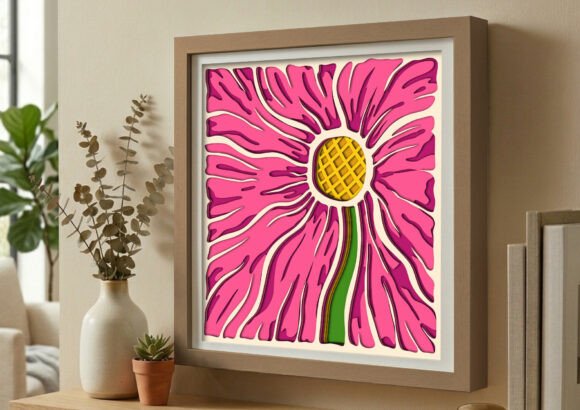
The Pink Coneflower Echinacea Shadow Box SVG is more than a decorative design — it's a functional digital asset that supports creative workflows for makers, crafters, and small business owners. This layered papercut file delivers a realistic botanical silhouette with depth and dimension, making it ideal for use in Cricut, Silhouette, and laser cutting environments. Whether you're crafting a gift, designing a home decor piece, or producing marketable handmade items, this SVG provides a structured starting point for clean, repeatable results.
How the Pink Coneflower Echinacea Shadow Box SVG Fits Into a Larger Creative Workflow
Design files like the Pink Coneflower Echinacea Shadow Box SVG often serve as the foundation of a digital-to-physical workflow. They bridge the gap between digital planning and physical execution. Before cutting or assembling, users import the file into compatible software such as Cricut Design Space, Silhouette Studio, or Adobe Illustrator. From there, adjustments can be made to size, layer order, or material settings depending on the intended output method.
During the project phase, the 6-layer design allows for intentional assembly, where each layer contributes to the final 3D effect. This is particularly valuable for creators who want to maintain consistency across multiple pieces, such as when producing items for sale or gifting in batches. After assembly, the shadow box can be framed, displayed, or incorporated into a larger botanical-themed decor scheme.
Compatibility and File Types: What You Need to Know
The Pink Coneflower Echinacea Shadow Box SVG comes with multiple file formats to support a variety of tools and workflows. The SVG file works seamlessly with Cricut Explore and Silhouette machines using the Designer Edition software. For those using free versions of Silhouette Studio, the included DXF file ensures compatibility without requiring a paid upgrade.
- SVG – Best for Cricut and Silhouette Designer Edition
- DXF – Compatible with free Silhouette software
- EPS – Ideal for vector editing in Illustrator or Inkscape
- AI – Editable source file for advanced customization
- PNG – High-resolution image with transparent background for mockups or digital use
- PDF – Includes assembly instructions and print-ready templates
These formats allow for flexibility in both digital and physical production. Designers can tweak the layers in Illustrator before cutting, while crafters can import the SVG directly into their machine’s software with minimal setup time.
Practical Use Cases for the Pink Coneflower Echinacea Shadow Box SVG
This design file works well in both personal and professional settings. Here are a few examples of how it can be integrated into different creative processes:
- Home Decor Projects: Frame the finished shadow box to add a touch of rustic elegance to a living room or bedroom. The pink and green color palette complements modern minimalist and nature-inspired interiors.
- Gift-Making: Create custom botanical art pieces for birthdays, housewarmings, or Mother’s Day. Because the design is digital, you can produce multiple versions quickly and efficiently.
- Small Business Production: If you sell handmade items at markets or online, this SVG can be used to produce consistent, high-quality products with minimal setup time per unit.
- Classroom or Workshop Use: Educators and craft instructors can incorporate the file into lessons on digital design, paper layering, and machine cutting techniques.
Design Preparation and Workflow Tips
Before cutting, it's important to review the layers and ensure proper alignment. Since the design features six distinct layers, organizing them by color or material type can streamline the cutting and assembly process. Consider labeling each layer in your software or printing a reference sheet to guide your build.
For best results, use cardstock or lightweight materials that hold shape without sagging. Thicker materials may distort the delicate petal details, while overly thin paper may not provide the desired depth. Testing a single layer first can help you fine-tune settings before committing to a full run.
If you're planning to make multiple copies, create a template for assembly. This can include a base frame or shadow box that you can reuse, ensuring each finished piece looks consistent and professional. This step is especially useful for small business owners or crafters producing items at scale.
Integrating with Other Tools and Resources
The Pink Coneflower Echinacea Shadow Box SVG works well alongside other design assets and tools. For example, it can be combined with digital mockup templates to visualize how the finished piece will look in different settings. You might also pair it with complementary botanical designs to create a cohesive collection of layered papercuts.
For those who sell their work, integrating this file into a product catalog or digital download store is straightforward. Many platforms like Etsy allow for instant delivery of digital files, which means you can offer the SVG as a standalone product or bundle it with physical materials for a DIY kit.
Long-Term Use and Quality Considerations
Because the file is vector-based, it can be scaled without losing quality. This makes it suitable for both small-scale personal projects and larger commercial applications. Keeping your digital files organized in a dedicated folder or asset management system ensures that you can quickly access and reuse them as needed.
Regularly backing up your files to cloud storage or an external drive protects against accidental loss. If you make custom edits to the SVG or AI files, save a copy of the original design before modifying it. This way, you always have a clean version to return to for future projects.
Final Thoughts on Implementing the Pink Coneflower Echinacea Shadow Box SVG
The Pink Coneflower Echinacea Shadow Box SVG is a versatile design asset that fits naturally into a range of creative and commercial workflows. Whether you're a hobbyist looking for a weekend project or a small business owner producing handmade goods, this layered papercut file offers both aesthetic appeal and functional value. Its compatibility with multiple cutting machines and design software makes it easy to integrate into existing processes, while the included documentation ensures a smooth start from download to final assembly.
By planning your workflow, organizing your materials, and understanding how to leverage the included file formats, you can make the most of this design and incorporate it seamlessly into your creative routine.